
Learn pixel art from scratch: a free course in 15 short lessons
You can learn pixel art in small daily steps: one 10-minute lesson a day, on a tiny grid, with only a few colors. This free course has 5 units and 15 lessons, from your first 8×8 heart to clean lines, color, shading and a little scene of your own. Tick off each lesson as you go.
Saved on this device only. Open a lesson, do it, then tap "I did it".
How this course works
- One lesson a day, about 10 minutes. Little and often is how pixel art (and most skills) stick.
- Every lesson has a goal, steps and a check. Do the check before you tick it off.
- Use any tool. Grid paper and colored pencils, a free browser editor like Piskel, or a pixel app on your phone.
- Go in order. Each unit uses what the one before it taught.
Pixels and the grid
-
1What pixel art is5 min
Goal: know the three choices behind every pixel art picture.
- Grid size: 8×8 for icons, 16×16 for small objects, 32×32 for characters, 64×64 for scenes.
- Colors: a few, picked on purpose. 2 to 4 on 8×8, 4 to 6 on 16×16.
- Every pixel placed by hand: no blur, no soft brushes. That is what makes it look crisp.
Check: draw a 16×16 empty grid (paper or app) and pick 4 colors for tomorrow.
-
2Your first sprite: an 8×8 heart10 min
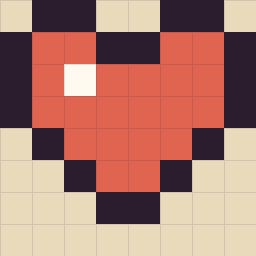
Copy this, row by row Goal: copy a sprite exactly by counting pixels.
- Go row by row, top to bottom. Count the empty pixels before each colored one.
- Outline first (dark), then fill (red), then one white pixel as the shine.
Check: put your heart next to this one. Every row should match.
-
3Draw half, mirror the rest10 min
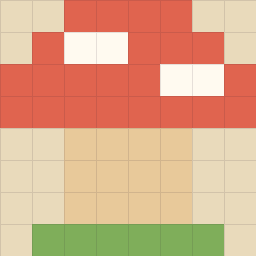
A mushroom is the same on both sides Goal: use symmetry to make neat sprites fast.
- Draw only the left half of a mushroom on 8×8.
- Mirror it: the pixel in column 1 is copied to column 8, column 2 to column 7, and so on.
Check: fold it in your head down the middle. Both halves are the same.
Lines and curves
-
4Clean straight lines10 min
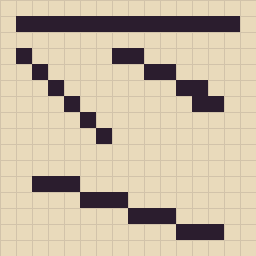
Every step in a line is the same length Goal: draw lines that look sharp, not wobbly.
- Draw a 1:1 diagonal (one pixel per step), a 2:1 (two per step) and a 3:1 (three per step).
- Keep every step in one line the same length.
Check: count the steps in each line. No step is longer or shorter than the others.
-
5Spot and fix jaggies10 min
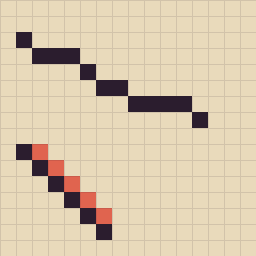
The red pixels are the problem Goal: see the two most common line mistakes.
- Uneven steps (1, 3, 1, 2) make a line look broken.
- Extra corner pixels (an "L" at each step) make a line look thick.
- Copy the picture, then fix both lines.
Check: your fixed lines have even steps and touch only at corners.
-
6Curves and circles15 min
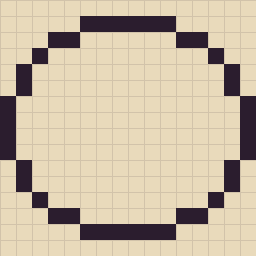
A 16-pixel circle: steps 6, 2, 1, 2, 4 Goal: draw round shapes that look round.
- Start with a long flat run at the top, then shorter steps toward the diagonal, then longer again down the side.
- Draw one quarter and mirror it to the other three.
- Try 8, 12 and 16 pixels wide.
Check: step lengths change gradually, never 3, 1, 3.
Color, light and shadow
-
7A small palette10 min
Goal: pick colors that work together.
- For one object, pick a dark, a middle and a light version of its color.
- Outline in a very dark color, not pure black: a dark brown or purple looks softer.
- Draw a strawberry or a leaf with only those 3 colors (plus the outline).
Check: squint at it. You can still see which side is light.
-
8Shade a ball15 min
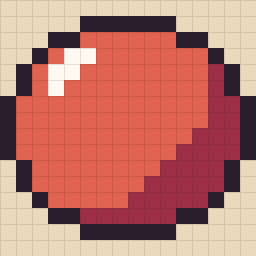
Light from the top left, 4 colors Goal: make a flat circle look round.
- Use your circle from lesson 6. Fill it with the middle color.
- Choose one light source, top left. Add a small highlight there.
- Add a crescent of the dark color on the opposite side, bottom right.
Check: the light comes from one place only.
-
9Dithering10 min
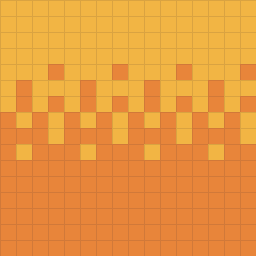
Two colors, a soft fade Goal: blend two colors without adding new ones.
- Fill the top with one color and the bottom with another.
- In between: a few dots, then a checkerboard, then mostly the second color.
Check: from far away it reads as a fade. Use it for skies, sparingly.
Shapes that read
-
10The silhouette test10 min
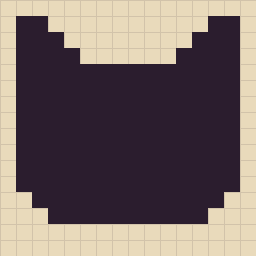
Still a cat in one color Goal: make sprites people recognize at a glance.
- Draw a cat's face on 16×16 in one dark color only.
- If it doesn't look like a cat yet, change the shape (ears, cheeks), not the colors.
Check: show it to someone. They name it in a second.
-
11Shrink it to 8×815 min
Goal: decide what matters.
- Take your 16×16 cat and redraw it at 8×8.
- Keep what makes it a cat (pointy ears, eyes), drop the rest.
Check: it still passes the silhouette test.
-
12Color your cat15 min
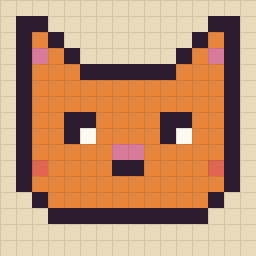
The same shape, now with color Goal: put units 2 to 4 together.
- Color your 16×16 cat: a dark outline, a base color, one shadow, pink ears and cheeks.
- Keep the light on the same side as your ball in lesson 8.
Check: 6 colors or fewer, clean lines, one light source.
Make your own
-
13Copy a picture, with a score20 min
Goal: train your eye on a bigger picture.
- Pick a 32×32 picture and paint it in by hand.
- On PixyPlace (we make it), open a drawing room, pick a gallery picture and paint it: a live "N% like the picture" shows how close you are.
Check: get above 90%.
-
14Your own object, from a prompt20 min
Goal: draw something nobody gave you a grid for.
- Pick one: a coffee mug, a potion bottle, a frog, a cupcake. More in our 40 easy pixel art ideas.
- 16×16, 5 colors: silhouette first, then colors, then light and shadow.
Check: it passes the silhouette test and has one light source.
-
15A tiny scene30 min

Sunset Lake, 32×32 Goal: a whole little place on 32×32.
- Sky first (try dithering), then the ground, then one object (a house, a tree, a sun).
- Keep the light from the same side everywhere.
Check: put it next to your lesson 2 heart. That's how far you've come.
After the course
Keep the habit: one small piece a day. Repeat any lesson that felt hard, and do the drills in 12 pixel art exercises for beginners. Drawing with someone helps too: on PixyPlace two people paint the same small canvas from their own phones, live. It's free, in the browser, with no account.
Questions
How do I start learning pixel art?
Start on a small grid (8×8 or 16×16) with 2 to 4 colors and copy a simple sprite like a heart, pixel by pixel. Then learn clean lines, circles, shading with one light source, and readable silhouettes, one short lesson a day.
Can I learn pixel art for free?
Yes. You only need grid paper and pencils or a free editor. This course is free, and so are browser editors like Piskel. On PixyPlace you can also paint pixel art pictures by hand in the browser for free.
How long does it take to learn pixel art?
With one 10 to 20 minute lesson a day, you can finish this course in about 3 weeks and draw clean small sprites. Getting really good takes months of regular small pieces.
Do I need to know how to draw to learn pixel art?
No. Pixel art is one of the easiest ways to start drawing: the grid makes shapes countable, so you can copy and learn step by step even if you've never drawn before.
What size should a beginner use for pixel art?
8×8 for your first sprites and 16×16 for most practice. Move to 32×32 for characters and small scenes once your lines and shading are clean.
Start lesson 1 today
Ten minutes, a tiny grid and four colors. Or jump in and paint a pixel picture with a live score.