
12 pixel art exercises for beginners, with grids to copy
The best pixel art exercises for beginners are short and small: draw clean lines and curves, build circles, shade a ball with one light source, and test whether a sprite reads as a silhouette. Do one 10 to 20 minute exercise a day on a 16×16 grid with 2 to 4 colors, in this order.
How to use these exercises
- One a day, 10 to 20 minutes. Short, regular practice beats one long weekend session.
- Stay small. 16×16 for almost everything. A small canvas makes every pixel a decision, and you finish.
- Few colors. Start with 1 to 4. Limits make you learn faster.
- Copy first, then change it. Copy the grid pixel by pixel, then draw your own version without looking.
- Any tool works. Grid paper and pencils, a free browser editor like Piskel, an app on your phone. The skills are the same.
Level 1: pixel art lines and curves (1–3)
Lines are the base of every sprite. Pixel lines look clean when their steps follow a pattern.
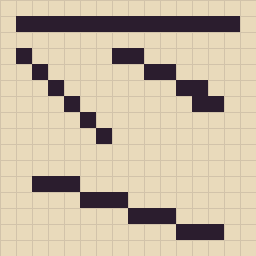
- Clean straight lines. On a 16×16 grid, draw a horizontal line, then diagonals with steps of 1 (1:1), 2 (2:1) and 3 (3:1). Every step in one line must be the same length.
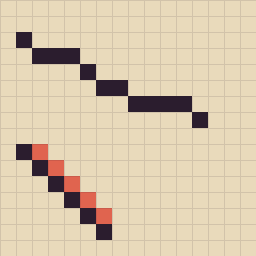
- Fix the jaggies. Draw a line with uneven steps (1, 3, 1, 2), then fix it. Then draw a 1:1 diagonal with an extra pixel in each corner, and remove them. Those extra corner pixels make lines look thick and blurry.
- Smooth curves. Draw an arc where the steps shrink evenly: 4, 3, 2, 1, 1. Then try a wave. A curve looks smooth when the step lengths change gradually (in a circle: shorter toward the diagonal, longer again after it), never jumping back and forth like 3, 1, 3.
Level 2: circles, shapes and copying (4–6)
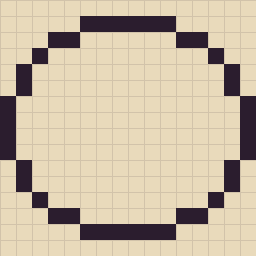
- Pixel art circles in three sizes. Draw circles 8, 12 and 16 pixels wide. Start with the long flat run at the top, then shorter steps toward the sides. Draw one quarter and mirror it so all four sides match.
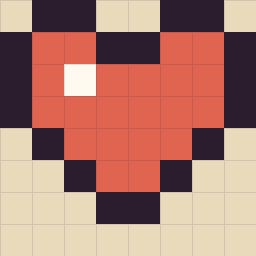
- Copy a sprite, pixel by pixel. Copy the 8×8 heart exactly, counting pixels row by row. Then copy a 16×16 one, like the cat in our easy pixel art ideas. Copying trains your eye to count.
- Mirror half. Draw only the left half of a mushroom, a ghost or a face, then mirror it. Symmetric shapes are the fastest way to good-looking small sprites.
Level 3: color, shading and dithering (7–9)
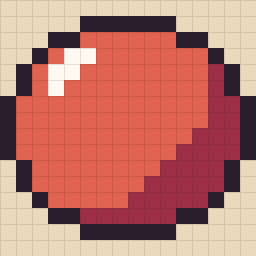
- Shade a ball. Draw a 16×16 circle and use 4 colors: outline, base, shadow and highlight. Put the light at the top left: a small highlight there, a crescent of shadow at the bottom right. This one exercise teaches most of what shading is.
- The 3-color challenge. Draw any small object (a strawberry, a key, a leaf) with only 3 colors. You'll find that one dark, one middle and one light color already give shape and depth.
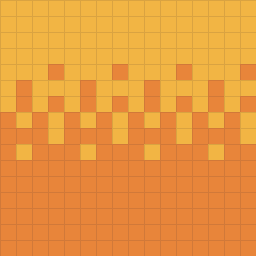
- Dithering. Fade one color into another using only patterns: a few dots, then a checkerboard, then mostly the second color. Use it for skies and soft shadows, but sparingly: too much looks noisy.
Level 4: readability (10–12)
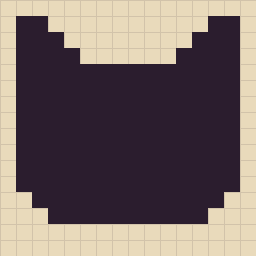
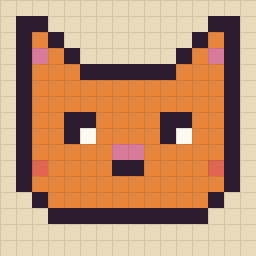
- The silhouette test. Fill your sprite with one dark color. If you can still tell what it is, the shape works. If not, fix the outline before adding any color.
- Shrink it. Redraw a 16×16 sprite at 8×8. You have to decide what matters (ears, eyes) and drop the rest. This is the core skill of pixel art.
- Daily prompts. Pick one thing a day from a list (a cup, a moon, a frog, a key, a cloud) and give yourself 15 minutes. Our 40 easy pixel art ideas work as a ready list.
A 2-week practice plan
- Days 1–3: exercises 1 to 3 (lines and curves). Redo the ones that felt hard.
- Days 4–6: exercises 4 to 6 (circles, copying, mirroring).
- Days 7–9: exercises 7 to 9 (shading, 3 colors, dithering).
- Days 10–11: exercises 10 and 11 (silhouette, shrinking).
- Days 12–14: daily prompts, using everything at once.
After two weeks, draw the same thing you drew on day 1 and put them side by side. Want a guided path instead of drills? Try our free course, learn pixel art from scratch in 15 short lessons.
Practice by copying, with a score
Copying a finished picture is one of the fastest ways to learn. On PixyPlace (we make it) you can open a drawing room, pick a pixel art picture and paint it in by hand. A live "N% like the picture" shows how close you are, pixel by pixel. You can do it alone, or send the link to a friend and paint the same canvas together from two phones. It's free, in the browser, with no account.
Questions
What should I practice first in pixel art?
Clean lines and curves. Draw straight and diagonal lines with even steps (1:1, 2:1, 3:1), then curves where the step lengths change gradually. Then circles, then shading a ball with one light source.
What size should I practice pixel art on?
16×16 for most exercises, and 8×8 when you practice simplifying. Small canvases make every pixel a decision and you finish each exercise in 10 to 20 minutes.
How long does it take to get good at pixel art?
With 10 to 20 minutes a day, most beginners see clear progress in two weeks: cleaner lines, rounder circles and shading that reads. Getting really good takes months of regular small pieces.
Can I practice pixel art online or on my phone?
Yes. Free browser editors like Piskel work on a computer, and many apps work on phones. On PixyPlace you can paint a pixel art picture by hand in the browser and see a live score of how close you are.
Is pixel art hard to learn?
It's one of the easier ways to start drawing: the grid makes shapes countable and you only need a few colors. The hard part is clean lines and readable small sprites, which is what these exercises train.
Start with one small picture
Open a drawing room, pick a picture and paint it in, pixel by pixel. It takes a minute to start and it's free.